Cosmos Builder FAQs
Cosmos Roadmap and Development FAQs
How do I request a new feature?
Tell your Cosmos Super User! We collate new feature requests from our Cosmos Super Users regularly.
Listing FAQs
What happens when I lock my listings pot?
When you lock your listings pot, this means that no new offers will be added to your listing pot from the time of locking. This means that new offers added to Dynamics since the time of locking will not appear on your campaign website.
Can any changes happen after I lock my listings pot?
Yes. If your offers in your listings pot change in Dynamics, such as a change in address or Terms of Offer, then these changes will reflect in your locked listing pot and on your campaign website. If a partner is deleted from Dynamics or an offer is disabled, then related offers will also be removed from your locked listing pot and campaign website.
Web Builder FAQs
Can I change the image or video per screen size?
Yes! there are two ways to do this :
-
Use Background images: background images can be set differently by screen size. This is because background images are a part of component styling. We recommend that background images are abstract and don't include text so that they resize well for different screen sizes.
-
Alternatively, you can include multiple images or videos on your webpage and use the visibility function to hide the ones you don't want to see for each screen size. If you use this option make sure that the image or video size is not too big, as the website loads all of them even if they are hidden, so large file sizes slow down the speed of the website. Here's a video demonstrating how to display different banners using the visibility function
Partner Code FAQs
I cannot upload Partner codes on an Offer
In Dynamics the Offers can be set to TLC Redemption Code or Partner Redemption Code. Only offers set to Partner Redemption Code allow the upload of codes, TLC Redemption Codes are auto generated.
##Winning Games FAQs
What happens to a Winning Moment when a winner's receipt is declined?
When a participation is declined for a consumer who won a Winning Moment prize, the prize is 'put back into the pot' to be won again by another consumer. The logic works like this:
-
Account Manager configures a Tier of Winning Moments in the website Consumer Journey area by specifying the desired number of Winning Moments (count) and timeframe (dates)
-
The Winning Moments are randomly generated, with timestamps down to the nanosecond, based on the selected count/dates
-
When a consumer participates, if there are Winning Moments available (in the past), the oldest is assigned to the consumer
-
When a Customer Service person declines a winning participation, the participation association to that Winning Moment is broken and at the same time, it is made available to be won again by another consumer who participates. This does not generate a new timestamp, but maintains it's original timestamp from step 2, so if it has become the oldest Winning Moment available, it will be the next one to be won by a consumer.
What time zone are winning moments based on?
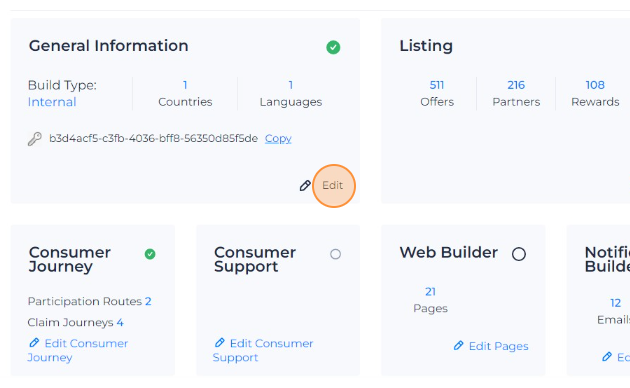
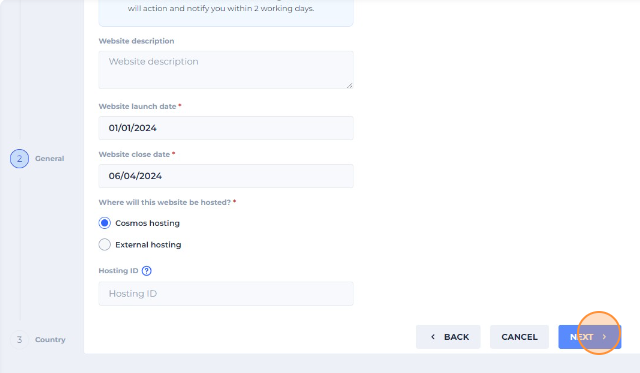
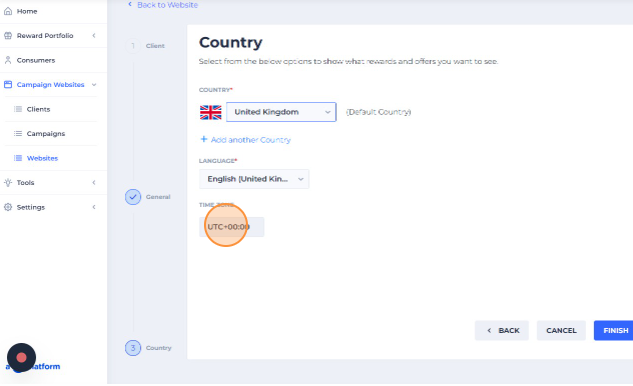
Winning Moments configuration is based on the time zone of country of the website, which you can see by following these steps:
- Navigate to the Website page and click "Edit" in in the General Information tile
- Click "Next" and on the following page you will see the time zone. Please note that the time zone cannot be changed as it is related to the time zone of the country this website is set to
Can a winner get multiple claims in a Winning Games Mechanic?
Currently, using a Winning Games Mechanic means that each participant can only have one claim. Multiple claims within Winning Games Tiers has been requested as a feature improvement
Website General FAQs
What’s the yellow icon next to the website URL? The tooltip says the “domain expired”, does this means my website is down?
All domains are automatically renewed when they reach the expiration date so when the icon turns yellow it just means that it has reached the expiration date. As we have auto-renewal it will be automatically renewed and the yellow icon will disappear from Cosmos UI soon.