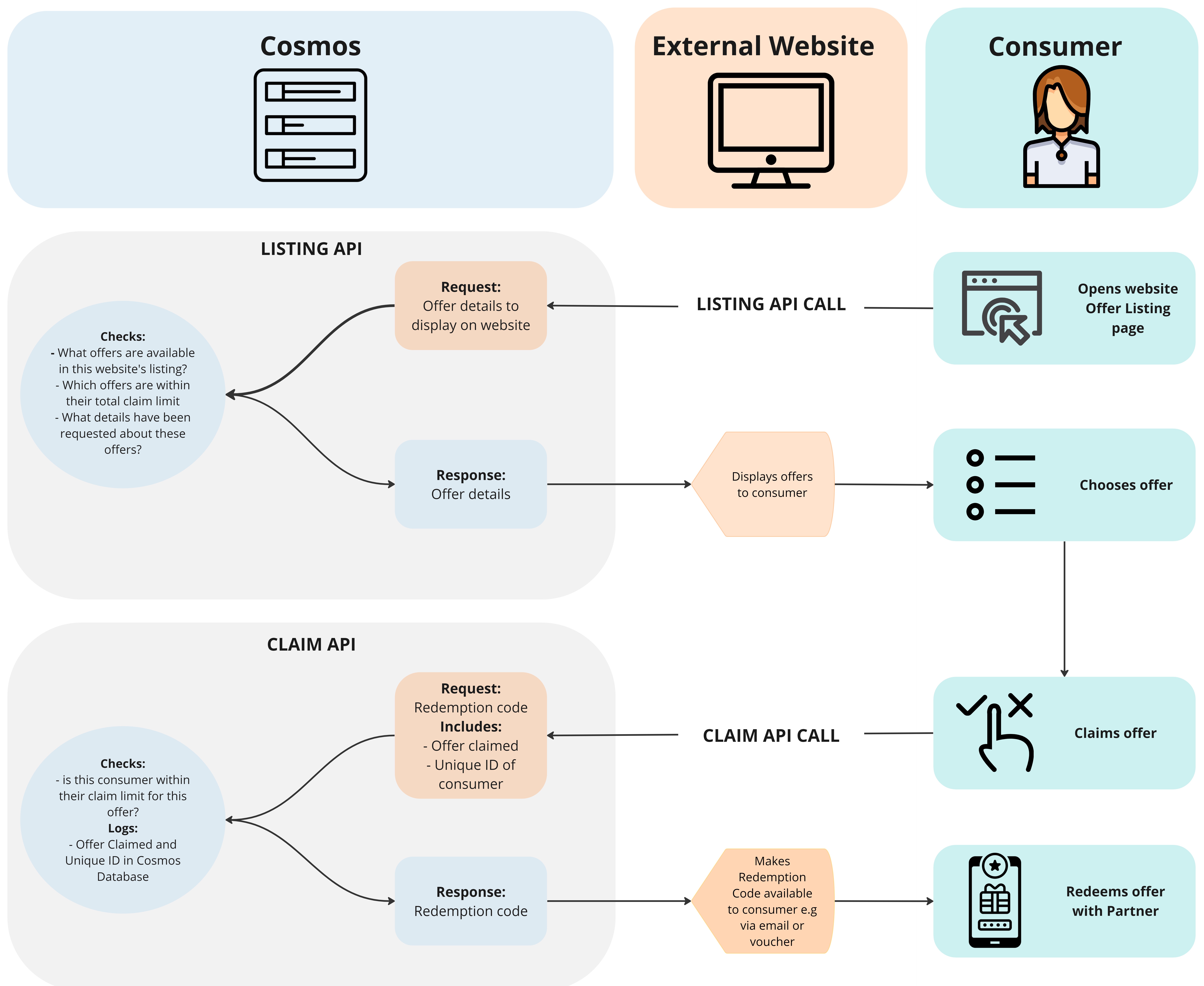
Cosmos APIs in a diagram
Listing API
Why use the Listing API?
The Listing API enables external websites (not built on Cosmos) to display offers from our Networks that are updated in real time based on the Cosmos Website Listing. This means that:
- We do not have to send any external providers a list of our partners or offers, protecting our IP
- When we update our Cosmos Listing, or change our offers in Dynamics, these updates will automatically appear on the external website. This way, our P&C and Account Management team members can change external website listings without any technical support, and we save ourselves and our external website providers lots of time.
Data available on the Listing API
The Listing API makes information available about the following entities from the Cosmos Website Listing. External websites can use this information to sort, filter and display listings on their website:
- Offers
- Locations
- Partners
- Rewards
- Experiences
- Subcategories
- Categories
- Subgroups
- Groups
- Tags
How can developers use the information on the API? What data is most commonly needed?
The API shares a lot of data about each of these entities, so its important that we provide external developers with clarity on how to find the data we want them to use and display. This could differ website to website. Each of the below end goals shows the data that is most commonly used and in which model in the API the external agency can find the data:
To Display Offers on a Listing and Final Offer Details
Offer Model
Offer refers to the specific offer that a consumer can redeem with one of our partners e.g. One free haircut at a particular beauty salon.
Offer is part of the Hierarchies:
- Category > Subcategory > Experience > Reward > Offer
- Partner > Location > Offer
| Item | Name in API Offer Model | Notes |
|---|---|---|
| Offer Name | name | Offer Name defaults to the same as the Reward Name but Account Managers can change this data within an Offer Listing for each website |
| Terms of Offer | offerTerms | Terms of Offer has a default for each offer but Account Managers can change this data within an Offer Listing for each website |
| Offer Type | type | e.g. Free, 2 for 1, Discount |
Location Model
Location refers to the place at which a consumer can redeem an offer from a partner. This could be a venue (such as a beauty salon) or an online address if it is a digital reward such as a movie download.
Location is part of the Hierarchy: Partner > Location > Offer
| Item | Name in API Location Model | Notes |
|---|---|---|
| Location name | name | |
| Address line 1 | address1 | |
| Address line 2 | address2 | |
| Address line 3 | address3 | |
| Post Code | postCode | |
| Website | website | |
| Phone Number | phoneNumber | |
| Location Type | locationType | e.g. venue, online, delivery. This field is useful to ensure online offers are displayed appropriately on websites e.g available in search results regardless of physical location but not visible on the map |
| Location Logo | logoURL | This is the logo to be displayed alongside the offer |
| Location Image | mainImageURL |
Partner Model
Partner refers to the organisation that is providing an offer. The Partner my be an HQ of a chain e.g. a Coffee Shop chain or overarching Association of many different locations e.g. a Martial Arts Association.
Partner is part of the Hierarchy: Partner > Location > Offer
| Item | Name in API Partner Model | Notes |
|---|---|---|
| Partner Name | name | |
| Partner Description | description |
To Display or Filter offers by Categories, Subcategories, Groups and Subgroups
Category Model
Category refers to the highest level of category within the TLC Rewards Networks. There are 7 Categories; Activities, Dining, Entertainment, Learning, Services, Travel, Wellness.
Category is part of the Hierarchy: Category > Subcategory > Experience > Reward > Offer
| Item | Name in API Category Model | Notes |
|---|---|---|
| Category Name | name | |
| Category Description | description | |
| Category Logo | logoURL | |
| Category Main Image | mainImageUrl | |
| Category Colour | color | The Category colour is a hex code corresponding to the category's brand colour, which can be used for website styling |
| Child Subcategories | subcategories | This item identifies if there are subcategories associated with this Category and what they are |
Subcategory Model
Subcategory is part of the Hierarchy: Category > Subcategory > Experience > Reward > Offer
| Item | Name in API Subcategory Model | Notes |
|---|---|---|
| Subcategory Name | name | |
| Subcategory Description | description | |
| Subcategory Logo | logoUrl | |
| Subcategory Main Image | mainImageUrl | |
| Subcategory Banner Image | bannerUrl |
Group Model
Group refers to a Group that has been created, within the context of a website, to categorise offers in a different way to the Categories already available, enabling offer segmentation that is relevant to a particular campaign. e.g. 'Winter', 'Summer', 'Kids', 'Adults'.
Group is part of the hierarchy: Group > Subgroup
| Item | Name in API Group Model | Notes |
|---|---|---|
| Group Name | name | |
| Group Description | description | |
| Group Logo | LogoURL | |
| Group Main Image | mainImageUrl | |
| Group Banner Image | bannerUrl | |
| Group Colour | color | The Group colour is a hex code corresponding to the Group's brand colour, which can be used for website styling |
| Child Subgroups | subgroups | This item identifies if there are subcategories associated with this Category and what they are |
Subgroup Model
Subgroup is part of the hierarchy: Group --> Subgroup
| Item | Name in API Group Model | Notes |
|---|---|---|
| Subgroup Name | name | |
| Subgroup Description | description | |
| Subgroup Logo | LogoURL | |
| Subgroup Main Image | mainImageUrl | |
| Subgroup Banner Image | bannerUrl |
To Filter Offers by Experience or Reward
Experience Model
Experience refers to a lower level categorisation than Categories and Subcategories, which is often used as a way for participants on websites to filter their offers by when there are a high number of offers. Experiences are the same across all TLC markets.
Experience is part of the Hierarchy: Category > Subcategory > Experience > Reward > Offer
| Item | Name in API Experience Model | Notes |
|---|---|---|
| Experience Name | title | |
| Experience Description | description |
Note that the Experience does have related images available in the API but these are not often used
Reward Model
Reward refers to a lower level categorisation than, which is often used as a way for participants on websites to filter their offers by when there are a high number of offers. Rewards are specific to each TLC market.
Reward is part of the Hierarchy: Category > Subcategory > Experience > Reward > Offer
| Item | Name in API Reward Model | Notes |
|---|---|---|
| Reward name | name | |
| Reward Description | description |
Note that the Reward does have related images available in the API but these are not often used
To Display Offers by Geographical Location e.g. on a map
Position Model
| Item | Name in API Position Model | Notes |
|---|---|---|
| Latitude Coordinate | latitude | |
| Longitude Coordinate | longitude |
To Display and Filter offers by Tags
Tag Model
Tags are used by TLC to identify offers as having particular attributes or belonging to a group of offers that cross the boundaries of other categorisations within our original database of offers on Dynamics.
| Item | Name in API Tag Model | Notes |
|---|---|---|
| Tag Name | title | |
| Tag Logo | logoUrl | |
| Tag Main Image | mainImageUrl |
Note that it is likely that many tags available within the API will not be relevant to every website, so ensure that the agency knows to implement filters to only use or display the tags that are relevant to their website or for Consumer to see.
All data on the Listing API
To view all of the fields available on the API for each entity:
- Navigate to the Cosmos Listing API Swagger
- Scroll down to the 'Schema' section at the bottom of the page
- Expand the entity that you want to see all of the fields for
Offer Limits on the Listing API
Some of our Offers may have a Total Claim Limit set on the Website Listing in Cosmos. Once an offer has reached its Total Claim Limit for a website, the Offer will not be sent to the external website via the API anymore, so it cannot be displayed. Please note that this is only possible if the website uses the Listing API and the Claim API because the Claim API lets Cosmos know how many times an Offer has been claimed.
Offer limits are set here: Website > Listing > Offer > Restrictions > Total claims
How to set your developers up to use the Listing API
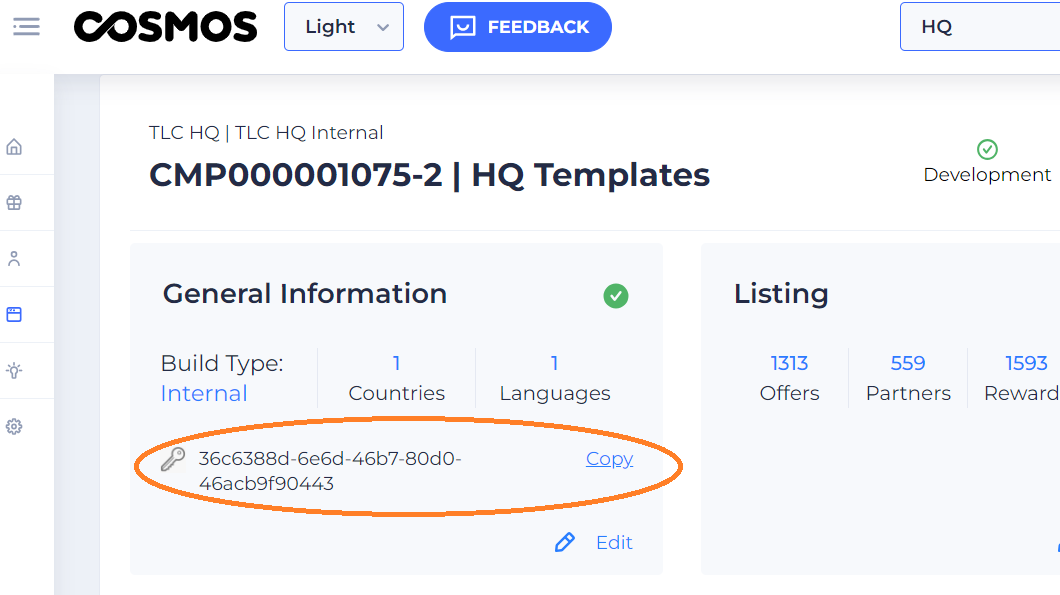
- Provide your developers with the API key for the website, which can be copied from the Website General Tile
-
Share the Listing API developer documentation with your developers. This page includes technical instructions about how to use the API. Externals can't access the link directly so save the page to pdf and send to them.
-
Do a test and check that they have identified the correct information. If necessary, provide them with more instructions about the data you want them to use
Claim API
Why use the Claim API?
The Claim API enables the external website to receive the Redemption Code for an Offer at the moment that a consumer claims it on their website. This means that:
- We do not need to send the client any Redemption Codes in bulk, but instead release them in real time as they are needed, helping us to manage our Partner Redemption Codes effectively
- We receive data from the external website about which offers have been claimed and by how many unique participants for our reporting
- We protect our partners and maintain our maximum claim limits by only sending Redemption Codes via the Claim API when the participant is within their Claim Limit

How the Claim API works
- Participant claims their offer on External website
- External website requests the Redemption code from Cosmos via the API. In order to make this request they have to send to Cosmos via the Claim API:
- The Offer ID
- A unique identifier of the participant
- Cosmos checks
- Is this website listed as External on Cosmos?
- Does this offer exist on the listing for this website?
- Is this consumer within their claim limit for this offer?
- Cosmos sends a response via the Claim API
If answer to all on 3 above is yes, then Cosmos responds by sending the Redemption Code back to the external website
- If the offer has Partner Redemption Codes, it takes the code from the Partner Redemption Codes uploaded to Cosmos.
- If the offer has TLC redemption codes, it generates the TLC Redemption Code at this point
- Cosmos logs the offer ID claimed and the unique consumer ID in Cosmos database
If answer to any of the 3 above is no, Cosmos responds by sending an error message back to the external website
- External website communicates the redemption code to the participant. This is managed by the external agency but could for example be by sending the participant an email or voucher with the Redemption Code or displaying it on the website.
How to set your developers up to use the Claim API
- Send a message to Helpbot " Cosmos API External"
- fill in the form with the required information
- IT team will create a unique webkey to provide access to the Claim API and send it to the developers on the email you provided along with the Claim API developer documentation and the Listing API developer documentation
- If it is the first time that the developers are using the API, or they need more support, IT will be available to have a call with them to clarify.